
Rental infrastructure
Would you hand a ₹2 lakh bike to someone you met four minutes ago?
Rental businesses do it every day. Wheeelink runs the bookings, inventory, payments and analytics — with identity verification and a searchable register of verified rental incidents at its core, so the call at the counter is made on a record rather than a hunch.
- Guided onboarding
- Export your data any time
- No setup fee
<30s
To create a booking
99.9%
Uptime target
12
Modules, one login
0
Double bookings, by design
The problem
Every rental business improvises the same stack.
Not for lack of care — for lack of software built for how rentals actually work. So operators assemble it themselves, out of a notebook, a group chat and a spreadsheet. It holds until the day it doesn't.
The paper register
The only record of who has what lives in a notebook behind the counter.
Bookings in a group chat
Requests arrive across three chats, two numbers and one person's phone.
Inventory in a spreadsheet
A file that's already out of date by the time anyone opens it.
Availability by phone call
Every "is it free on Saturday?" costs a call and ends in a guess.
Bookings that never land
A message missed at 9pm is revenue that simply never arrives.
Double bookings
Two customers, one asset, and one very bad Saturday morning.
Every counter starts from zero
What one business learned the hard way, the next one has no way to know.
No visibility
You know the busy days by feel. You find out about the rest in hindsight.
Assets in limbo
Which unit is out, with whom, in what condition, and due back when?
One booking, two systems.
A Saturday rental — two helmets, one bike, four hours. Here's where that booking actually lives today, and where it lives on Wheeelink.
Today
Counter register, page 41
R. Iyer — 1 MTB + 2 helmets — Sat 10am — dep. 2000?
bro is the black one free saturday morning
WhatsApp, 11:42pm
inventory_final_v3.xlsx
MTB-04 · status: ??? · last edit: 9 days ago
Unknown number · no voicemail · no booking
Missed call, 8:07am
On Wheeelink
- Customer
- Rohan IyerVerified
- Asset
- MTB-04 · Trail 29"
- Add-ons
- 2 × helmet
- Window
- Sat 10:00 — 14:00
- Deposit
- Held
- Balance
- Paid
One record. Searchable, auditable, and the same on every screen in the business.
The solution
One system of record for everything you rent.
Nine modules on one login. Each is useful alone. Together they mean a booking, an asset, a customer and a payment are finally the same object.
Bookings
Availability is calculated from asset state, not maintained by hand. Extend a booking mid-rental and the calendar, the price and the return time all move together.
- Day, week and per-asset views
- Drag to extend or reschedule
- Conflicts blocked at entry
How it works
One rental, from the counter to the keys.
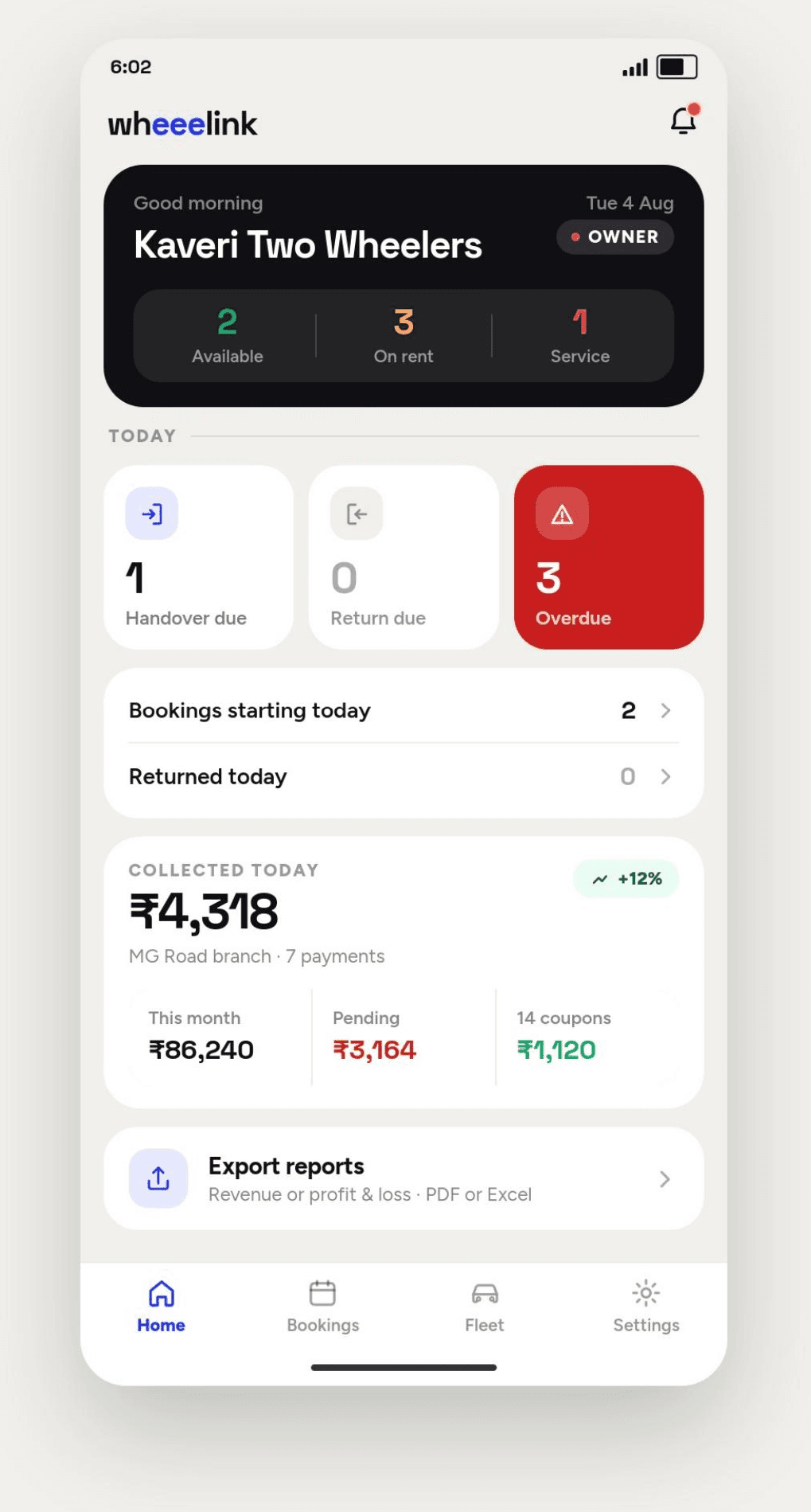
Four steps, in the order they happen. Everything below this section explains one of them in depth — this is the whole shape in one screen.
- 01
Under a minute
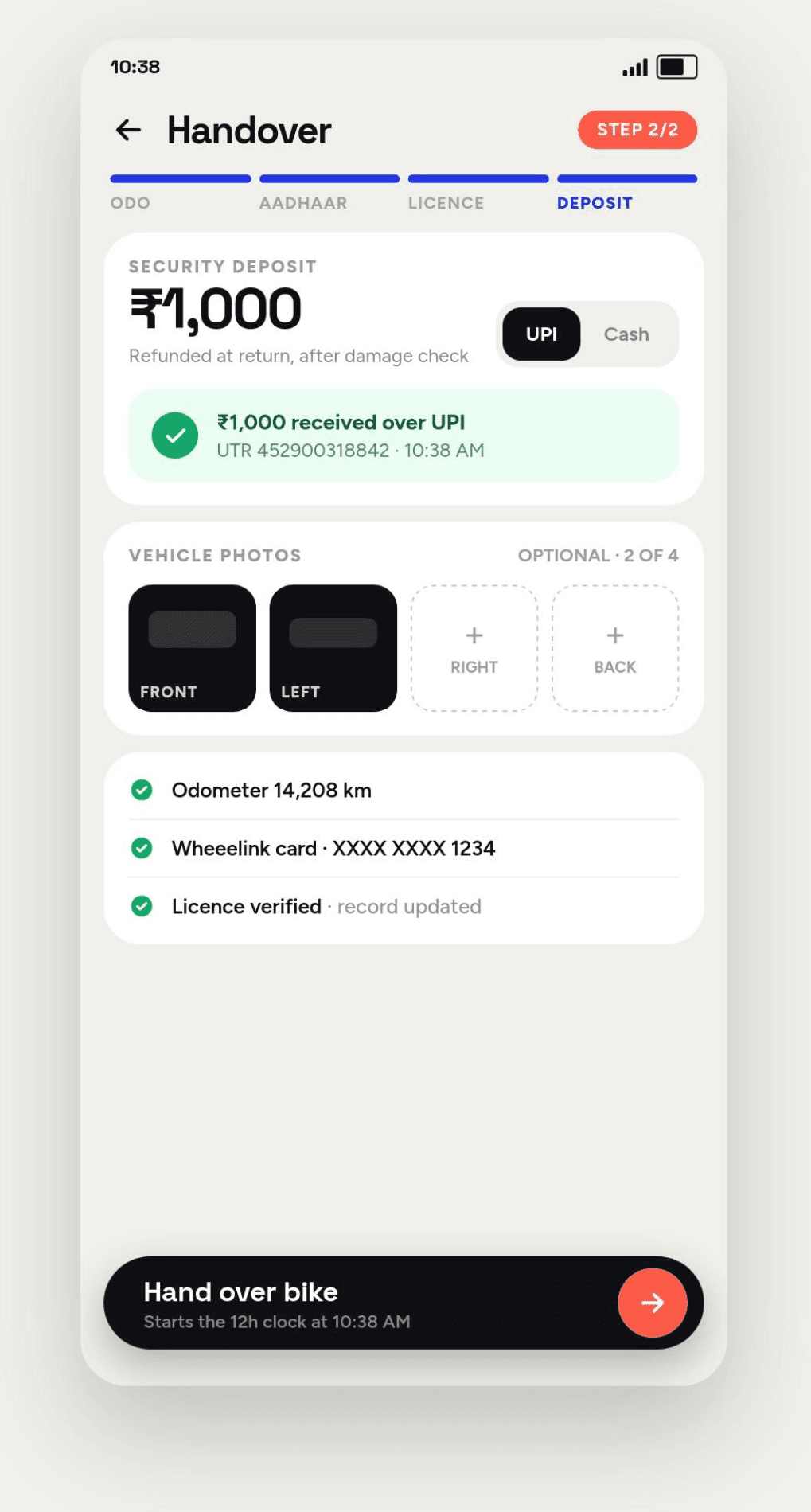
Take the booking
Scan the licence and the number and name fill themselves in, or type them if the light is bad. The customer picks a duration and a bike from what is genuinely free, and the fare is priced before anyone agrees to anything.
- 02
Consent captured first
Verify who you are handing it to
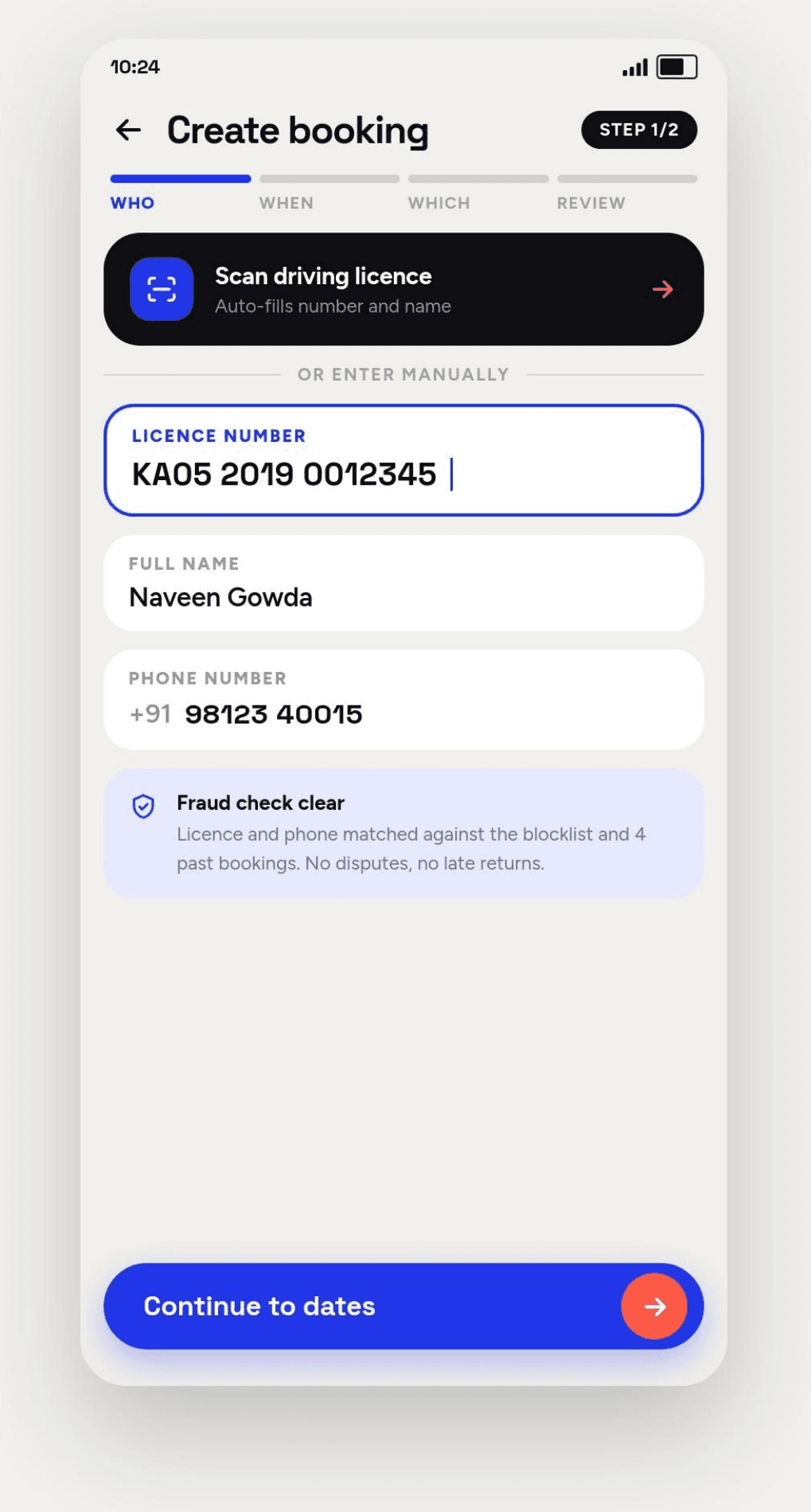
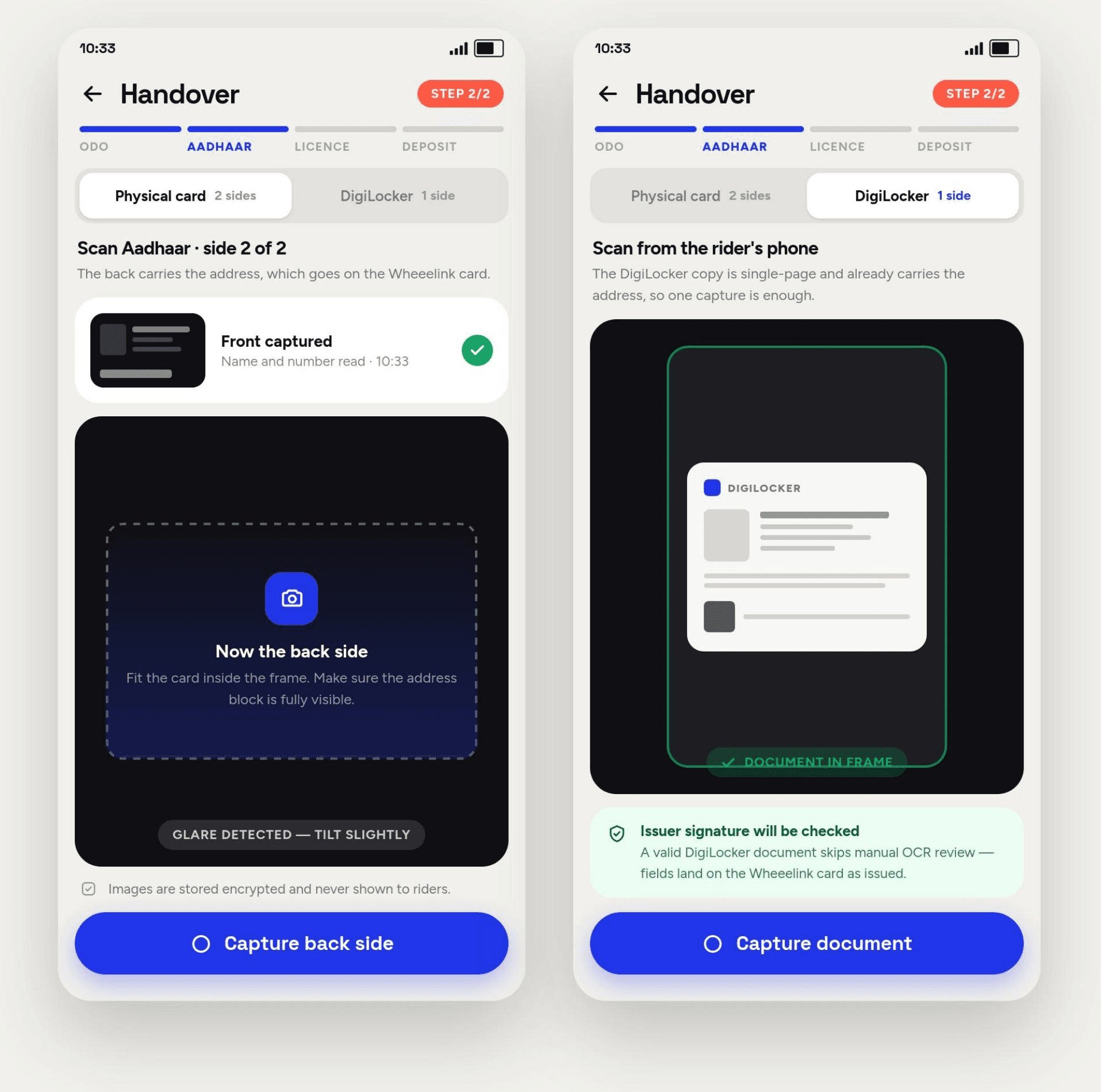
Consent first, then the document — a physical card captured side by side, or the DigiLocker copy whose issuer signature is checked for you. The register is searched at the same time, and a licence with reports on file stops the handover until your staff lift it.
- 03
The clock starts here
Hand over the asset
Odometer reading, condition photos, deposit collected and receipted. The booking moves to Out, the return clock starts, and everything captured at the counter is attached to that one record.
- 04
Live from any screen
Watch it, and close it
What is out, what is due back and what is overdue, on the owner's phone from anywhere. On return the deposit is settled after the damage check and the booking closes against the day's takings.
Steps 2 and 3 are where most of the risk in this business sits, which is why they get a section each below.
Platform
The counter, the phone and the back office, in sync.
The same operation on whichever screen is closest. A booking taken at the counter is on the owner's phone before they've looked up.
Overview
Sat 12 JulRevenue today
₹4,280
+18%
Out now
18
of 34
Overdue
1
1 asset
Revenue · 7 days
+24.1%
Fleet utilisation
- E-bikes92%
- Mountain87%
- City74%
- Kids41%
Network check
Licence checked0 incidents on fileBK-2481 · 10:02Today's bookings
5 of 27- BK-2481Rohan IyerBooked
- BK-2480Sara FeldOut
- BK-2479M. HalvorsenOverdue
- BK-2478Ana RibeiroReturned
- BK-2477J. OkaforBooked
Built for the counter
Four actions on one screen. Staff work unaided within the hour.
Owner's view, anywhere
Today's revenue, what's out, and what's overdue — on the phone.
Sync you don't think about
The counter keeps working through a dropped connection and catches up after.
Core features
Everything a rental operation needs, already in the box.
No modules to buy back, no integrations to assemble. This is what you get on day one.
Booking calendar
Day, week and per-asset views with drag-to-extend.
Real-time availability
Derived from asset state, never maintained by hand.
Asset registry
Serials, condition, service history and documents per unit.
Customer profiles
History, balance, notes and flags on one record.
Identity verification
Consent-first capture with configurable retention.
Network check
Search verified incident reports before you approve a rental.
Payments and deposits
Collect, hold, refund and reconcile in the booking.
Staff and roles
Granular permissions, per-branch access, activity trail.
Condition logs
Photo evidence attached before and after every rental.
Pricing rules
Hourly, daily, weekly, seasonal and per-customer rates.
Online booking site
A branded page that writes straight into your inventory.
Automatic notifications
Pickup, return and overdue reminders that send themselves.
Exports and reports
CSV, PDF and scheduled email, in your accountant's format.
Your own records
Verify customers without becoming a data liability.
Before anything is shared with anyone, there is the record you hold yourself. Wheeelink keeps it minimal, consented and on a clock — which is the precondition for everything in the next section.
Consent
Given by the customer at 10:02, before any document was requested.
Collected
- Government ID
- Phone number
- Home address
- Date of birth
- Emergency contact
This business turned three fields off. Wheeelink never asked for them.
Retention
deletes in 71 days
Two people in this business can open the stored document. Every open is written to the audit log with who, when and why.
- GDPR-aligned handling
- DPDP-aligned consent
- Data residency options
- SOC 2 Type II· in progress
Consent first, always
Nothing is captured without explicit, timestamped consent. The customer sees what's being asked for and why, before they agree to it.
Only what you need
Configure the exact fields your business requires. Wheeelink never asks a customer for more than that.
Encrypted end to end
Documents are encrypted in transit and at rest, stored separately from operational data, and never sold or shared.
Retention you control
Set how long records live. When the window closes, Wheeelink deletes them automatically and records that it did.
Role-based access
Counter staff can verify without ever seeing a stored document. Only the roles you name can open one.
Auditable by default
Every view, export and deletion is logged with who, when and why — so an access request has an answer.
For the records you hold in your own account you remain the data controller, and Wheeelink provides the consent, retention and access controls — we recommend confirming your obligations with local counsel. The verification network is governed separately; see that section.
Verification network
Rent with confidence.
Know more before every rental decision. Rental businesses work alone, so what one counter learns the hard way, the next one learns the hard way too. Wheeelink keeps a register of verified rental incidents — you search it for the customer in front of you, and a licence with reports on file stops the handover until someone at your business decides otherwise.
- Authorisation first
- Every report is attributed
- Subjects may contest
- Every report expires
- The override is yours
- No score, ever
CHK-90422 · 10:41
RETAINED 90 DAYS
01 · Subject
Consent given 10:02 — before the search ran.
Driving licence
Wheeelink checks the number and does not keep it.
The customer hands you a licence.
Consent is captured at the counter first, then you enter the identifier the customer has given you. A search needs a live rental application behind it — and the enquiry is logged against your business, not only against theirs.
02 · Register searched
- Asked
- 28
- Answered
- 28
- On file
- 1
Participating businesses whose filed reports were searched.
Not searched
- Credit files
- Criminal records
- Government databases
- The open web
- Data brokers and purchased lists
Wheeelink searches the register.
One identifier, one search, against reports filed by participating businesses. You are not given anyone's customer list and you cannot browse, list or export the register — you get an answer about the person in front of you. Nothing on file is what most searches return.
03 · On file
- 41
- Rentals completed without incident
- 2
- Reports on file
- Verified
Asset not returned under the agreement
Filed by Coastline Cycles · 14 Mar 2026
Documentation attached. The customer was notified the day it was filed.
Expires in 412 days
- Disputed
Document could not be validated at pickup
Filed by Meridian Mobility · 02 Feb 2026
The customer has contested this report. It shows as disputed to everyone who searches it.
Under review — 9 days remaining
What comes back is a record, not a verdict.
A category, a date, and the business that filed it — set beside the rentals the same customer completed without incident. A report being contested arrives labelled disputed, and says so to every business that searches it.
04 · Vendor decision
- Approve
- Approve with conditions
- Decline
To be completed by the vendor
Wheeelink stops the handover. It never ticks this box.
Booking raised
BK-2481
BookedThe handover stops. You decide whether it continues.
A flagged licence halts the handover before the keys move, and the screen shows what was filed, by which business, with the documentation attached. Your staff can override it with a PIN and carry on — the override is logged with their name. Wheeelink sets the default; it does not make the call, and most of the value here is adjusting the terms of a rental rather than refusing one.
- WHEEELINK
- DOC WL-VN/04
- REV 2
- SHEET 1 OF 1
- ILLUSTRATIVE
Illustrative record. No score is produced and no person is classified. A licence with reports on file stops the handover by default; lifting that stop is the vendor's decision, taken by a named member of staff and logged.
What a business can file.
The list is closed, and it is short. A report describes something that happened under a rental agreement, with documentation attached — never an opinion about a person.
Can be filed
- An asset not returned under the rental agreement
- A document that could not be validated at pickup
- Documented damage left unpaid after a notice period
Never enters the register
- Rudeness, arguments or complaints
- A return a few hours late
- A dispute that is still open
- Suspicion, or a hunch
- Anything about who the customer is
Three things can be filed. Everything else never enters the register.
Better customer verification
Confirm the person is who the document says. That check stands on its own, and most rentals need nothing more.
Reduced operational risk
Fewer decisions made blind, on the days when the counter is busiest and the questions get skipped.
More informed decisions
Context before the keys leave your hand — and the option to adjust a deposit rather than refuse a customer.
Knowledge that outlives one counter
What one business documented is searchable by the next. No business receives another's customer records.
Confidence at handover
You are handing a valuable asset to someone you met four minutes ago. This is one more thing you know first.
Digital rental history
Completed rentals count too. A long clean history is a trust signal, and it is the most common thing a search returns.
Faster verification
A search resolves while the customer is still filling in the form. Nothing about the check slows the counter down.
What this is
- A register of verified rental incidents, filed by the businesses that experienced them.
- Searched one customer at a time, with consent captured first and every enquiry logged.
- A blocklist: a licence with reports on file stops the handover by default, and your staff override it with a PIN.
- Available only where local law permits a shared incident record.
What this is not
- Not a score, a rating or a ranking. No number is produced and no person is classified.
- Not a refusal you cannot lift — the stop is a default, and the override belongs to your business.
- Not a credit check, a criminal check or a background check.
- Not a customer list. Businesses cannot browse, download or receive the register.
Who is accountable
- The business that files a report puts its own name on the face of it.
- The customer is told the day a report is filed, sees who filed it, and disputes it free of charge.
- Wheeelink reviews disputes and audits filing patterns. Unsupported reports cost a business its access.
Wheeelink records what happened under a rental agreement. It does not rate people and it produces no score — but it does act on what is filed: a licence with reports against it stops the handover until a named member of your staff lifts the stop, and that override is logged. Every report names the business that filed it, is disclosed to the customer named in it, can be contested at no cost, and expires on a fixed clock. Unlike the identity records you hold in your own account, Wheeelink is a controller of the network register in its own right; the responsibility is shared rather than passed to you. The network operates only where local law permits a shared incident record, and we recommend confirming your obligations with local counsel before switching it on.
Business analytics
The numbers, while they still matter.
Not a report you read three weeks late. Revenue, utilisation and demand, updated as the day happens.
Revenue · last 7 days
₹2.4L
+24.1%
vs. previous week
Sat cleared ₹61.2k — more than Monday through Wednesday combined. That's the shift you staff for.
Utilisation by category
- Mountain bikes87%
- City bikes74%
- E-bikes92%
- Kids bikes41%
- Accessories63%
Kids bikes sit idle six days in ten. Either they're priced wrong, or that shelf space belongs to e-bikes.
+18%
Weekend revenue
Saturday now clears three weekdays combined.
34%
Repeat customers
A third of rentals come from someone you've served before.
10—13h
Peak window
Where the queue forms, and where to put your staff.
92%
E-bike utilisation
Your highest-earning category is also your tightest.
Where this goes
Rentals are an industry without infrastructure. We're building it.
Payments got Stripe. Commerce got Shopify. The rental economy — bikes, cars, cameras, gear, equipment, boats — still runs on notebooks. Wheeelink starts as the software one rental business runs on, and becomes the layer the category is built on.
Shipping now
Shipping now
In production with operators today.
- Vendor dashboard
- Booking management
- Inventory management
- Customer management
- Business analytics
- Reports
- Staff management
- Online booking site
- Customer verification
- Payments
In development
In development
In build, with design partners.
- AI Copilot
- Dynamic pricing
- Vendor CRM
- Multi-city operations
On the roadmap
On the roadmap
Committed direction, not yet dated.
- Rental marketplace
- Fleet intelligence
- Rental APIs
- Enterprise solutions
Built for any rentable asset
- Bikeslive
- Scooterslive
- Cars
- Cameras
- Camping gear
- Equipment
- Boats
- Luxury
Any asset that gets rented, returned and rented again.
Pricing
Plans that start where you are.
Priced on the size of your fleet and the modules you use. No setup fee, no long contract, and no charge for the people you add.
Counter
A single outlet finding its feet
- Bookings and inventory
- Customer profiles
- Daily close report
- Up to 2 staff logins
Operator
Most chosenMultiple outlets and a real team
- Everything in Counter
- Verification and payments
- Online booking site
- Analytics and exports
- Unlimited staff logins
Infrastructure
Fleets, franchises and platforms
- Everything in Operator
- Multi-city operations
- Rental APIs and webhooks
- Data residency and SSO
- Named support
Book a demo and we'll price your operation on the call — not after three follow-up emails.
Questions
The things operators ask first.
Not covered here? Ask us directly — a person replies, usually the same day.
Ready to run your rental business on software?
Thirty minutes, no slides. We'll load your actual inventory during the call, take a live booking through it, and you can decide from there.
- We set up your fleet on the call
- No obligation, no follow-up sequence
- Straight answers on pricing and timelines
Prefer email? Write to sales@wheeelink.com.